Background and goals
I built a home lab to practice system administration and investigating alerts on equipment I own. My goal is to follow a signal from its origin to Wazuh, understanding what was detected and what additional context is needed to interpret it.
The environment combines Windows, a Raspberry Pi running Linux, and a virtualized Wazuh server. I also added backup monitoring because data availability is part of defensive security.
Architecture
- Windows: Wazuh agent and Sysmon as endpoint event sources.
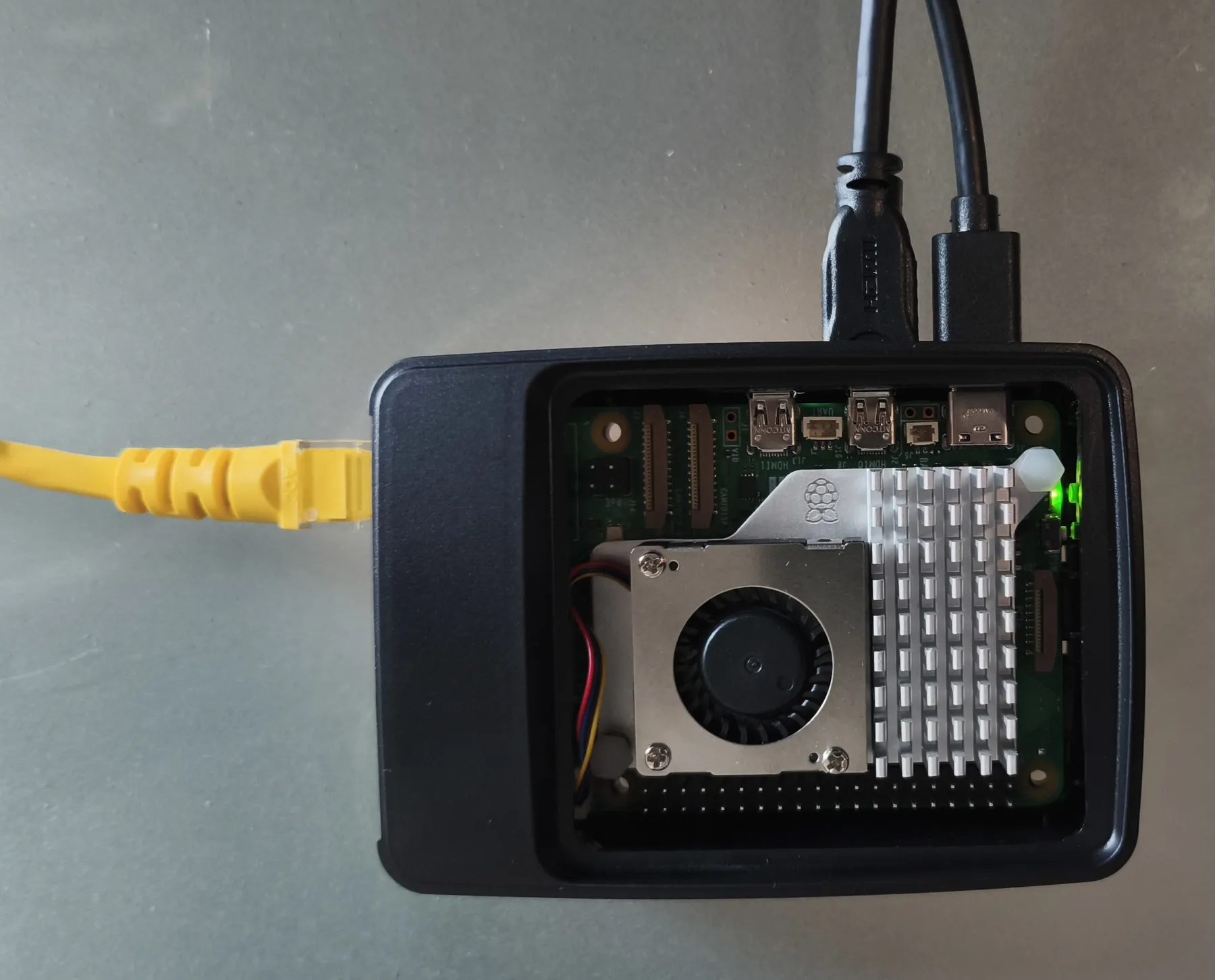
- Raspberry Pi 5: Suricata sensor and Wazuh agent collecting Linux and IDS logs.
- Managed switch: mirrors the PC’s traffic to the sensor in both directions.
- Virtual machine: hosts Wazuh Manager, Indexer, and Dashboard in VirtualBox on the PC.
The switch sends a copy of PC traffic to Suricata. Its EVE log and Linux events reach Wazuh through the Raspberry Pi agent. The Windows agent contributes endpoint events. Both sources can be examined on the server.
The diagram loads when this section comes into view.
flowchart TD P["PC traffic"] --> M["Switch port mirroring"] M --> S["Suricata and EVE log"] S --> A["Linux agent"] L["Linux and backup events"] --> A W["Windows and Sysmon"] --> B["Windows agent"] A --> C["Wazuh server"] B --> C C --> D["Dashboard investigation"]The diagram summarizes how events are collected; it does not imply that a joint correlation rule exists across every source.
From a test signal to an alert
The documented exercise uses a prepared local HTTP response to trigger a Suricata signature. It is a controlled simulation inside the lab, with no exploitation or real compromise.
Interactive demonstration
From test traffic to an alert
Explore the five stages of a controlled SOC test. These fields summarize documented checks; they are not live logs.
Stage 1 of 5
Prepare the signal
I generate a controlled HTTP response to check whether the lab detects a known pattern.
- Signal or evidence
- Test HTTP response in my own lab.
- What I check
- There is no alert yet: this is the starting point.
Stage 2 of 5
The sensor receives the traffic
The switch mirrors PC traffic to the Raspberry Pi. Suricata can inspect the copy without being in the traffic path.
- Signal or evidence
- PC traffic → port mirroring → network sensor.
- What I check
- I verify the copy reaches the sensor before interpreting alerts.
Stage 3 of 5
Suricata matches the signature
The test response triggers signature 2100498, and the event is recorded in EVE JSON.
- Signal or evidence
- Signature 2100498 · allowed action · EVE JSON log.
- What I check
- Allowed means the traffic passed through. Here Suricata detects; it does not block.
Stage 4 of 5
The alert reaches the dashboard
The Raspberry Pi agent collects the event and forwards it to the Wazuh server for investigation.
- Signal or evidence
- Wazuh rule 86601 · level 3 · source: Linux sensor.
- What I check
- I can trace the same signal from Suricata to Wazuh.
Stage 5 of 5
Interpret the result
I check the alert source, the rule that fired, and what its action means.
- Signal or evidence
- Verified chain: test → Suricata → agent → Wazuh.
- What I check
- I document the result and distinguish detection from any potential response. No real security incident occurred.
The result confirms that this signal traveled from the sensor to Wazuh. By itself, it does not demonstrate the detection of a complete attack.
Backup monitoring
The backup monitor produces JSON events for failures and recoveries. I configured the Linux agent to read them and validated local rules with wazuh-logtest. The documentation includes warnings for a missing backup drive and subsequent recovery, visible in the dashboard.
This applies the same method to an operational issue: identify the problem, inspect the event, and confirm that the return to normal is recorded.
Independent Windows test
I also documented a controlled test using encoded PowerShell. According to the lab record, Wazuh received an alert for rule 92057, level 12, mapped to MITRE T1059.001. This exercises the Sysmon/EventChannel data source separately from the Suricata and HTTP tests above. It is not a real attack or evidence of traffic being blocked. The selected image shows the test command, not the event as displayed in Wazuh.
Visual evidence
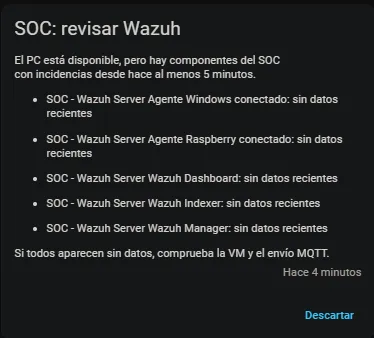
The following are reviewed photographs and historical screenshots. The Home Assistant warning shows stale monitoring data after the monitor was stopped; it does not establish that every Wazuh service stopped.
Select an image to enlarge it. Use the arrow keys to navigate and Esc to close.

Decisions and lessons learned
- Distinguish detection from blocking instead of attributing a response to an IDS that does not perform one.
- Centralize records while preserving their source: a network event and an endpoint event offer different perspectives.
- Move Suricata logs to the SSD and verify rotation to manage storage growth.
- Check each integration stage before adding more rules or dashboards.
Scope and limitations
The Wazuh server depends on the PC hosting its virtual machine; it is not always available when the PC is off. Verified mirroring covers the PC’s traffic, not all Wi-Fi traffic. The HTTP exercise does not prove HTTPS content inspection or permanently lossless capture.
This case study summarizes checks documented through October 25, 2026. The gallery uses three reviewed copies without private metadata; full alerts containing identifiers are excluded. The operational dashboard remains private.
The network infrastructure supporting capture and remote access is covered in my home network and services project.